Case Study: How we turned a builder's brochure site into a $500k/yr lead machine
Builder Website Teardown — Modern Homes Tasmania

Most tradie sites are built for referrals. Not revenue. They lose $120k–$1.8M a year because of it.

A business-card site loses the $400k job before anyone picks up the phone. We rebuilt Modern Homes Tasmania's site from the ground up and documented every decision.

$700k–$1.8M in missed work / yr 2-week build 6 ways to capture an enquiry 29 local search pages pulling in traffic 11 changes documented
modernhomestas.com.au
Original Modern Homes Tasmania website — before TradesPro rebuild Before
TradesPro rebuild — live demo ↗
Rebuilt Modern Homes Tasmania website — after TradesPro After
$1.8M
in missed work / yr (mid-tier)
2 wks
to build
6
ways to capture an enquiry
29
articles pulling in Google traffic
50+
pages working for local searches
12
tools doing the selling
The Cost of a Site Built for Referrals, Not Revenue

Most tradie sites aren't built to win new business.
That's not an accident.

Most tradie websites are built for people who already know the tradie — a place to send people who've already decided. Not a tool that wins work from homeowners who've never heard of them. That's not an accident: it's what's fast and cheap to build, so nobody notices the jobs they're losing.

There's no invoice for the job you didn't win. No line item for the $400,000 contract that went to the builder whose site looked more worth calling. You just don't hear from them. Run the numbers and it shows up.

"Your website isn't broken. It's just built for the wrong job."

The cost of a site built for referrals, not revenue — two scenarios
Scenario A

Small team — 1–2 people
(plumbing, electrical, small trades)

Monthly visitors 800
Enquiries from a basic site 0.4% of visitors
Enquiries from a TradesPro site 2.5% of visitors
Extra enquiries / month +16
Close rate 20%
Extra jobs / year ~3 jobs
Average job value $4k–$40k
Jobs you're not winning per year $12k–$120k
Scenario B

Mid-tier — 4–5 people + subs
(builders, renovators, new builds)

Average contract value $350k–$620k
Extra jobs sourced digitally / year 2–3 jobs
Work being won by someone else $700k–$1.8M
But the bigger thing: a site that looks worth calling wins the good jobs — the $500k new builds, the full kitchen + bathroom packages. The site that doesn't look the part gets price-shoppers and the work nobody else wanted.
Work you could be winning per year $700k–$1.8M

The site is the first impression — and most tradies are losing the job before anyone picks up the phone.

The tradie with a site that looks the part gets shortlisted for the $400,000 job — not because they're better, but because they look like the better choice before a conversation happens. In high-value trades, the site is the first sales call.

Referrals dry up and seasons slow. The builder whose site brings in new work keeps the diary full regardless. The one without is always a quiet month away from chasing jobs.

$12k

Small trades, conservative

3 extra jobs a year at $4k average — a 1–2 person plumbing or electrical business with 800 monthly visitors

$120k

Small trades, high-value jobs

Same 3 extra jobs but at $40k average — electrical fit-outs, plumbing upgrades, higher-margin work

$700k

Builders, conservative

2 extra new builds a year at $350k each — found the business online instead of through a referral

$1.8M

Builders, high-value

3 extra $620k builds a year — the big jobs that go to the builder who looked worth calling

The Audit — What It Had, and What Was Missing

What it had, and what was missing

The foundation was solid. It didn't need a new look. It needed to actually bring in work. We found six things holding it back, each one stopping a ready buyer from taking the next step.

Hero image — present but obscured

Had: A full-bleed hero of a finished home, the builder's strongest selling point. Missing: The photo was darkened so heavily you could barely see the home they'd built.

Portfolio — photos without transformation

Had: A real gallery of quality finished photos. Missing: No "before" state or transformation context. A finished photo doesn't show the skill it took to get there.

Contact — one path, not two

Had: A prominent phone number for call-ready buyers. Missing: No form, no email capture. Everyone not ready to cold-call a stranger had no path forward.

Services — described but not contextualised

Had: Services named and visible: new builds, renovations, extensions. Missing: No process timeline. "What happens after I call?" was never answered, the #1 reason prospects research but don't enquire.

Reviews: great ones, but nobody could see them

Had: Real Google reviews, sitting on a Business Profile. Missing: Zero displayed on-site. To verify quality, visitors had to leave the page, and often didn't return.

Nobody new could find them on Google

Had: Steady work from referrals and word of mouth. Missing: No articles, no guides, nothing showing up for the hundreds of Tasmanian builder searches happening every month. When referrals slowed, so did the work.

The original site was built for people who already knew the builder. The rebuild is for people who don't — yet.

What we built

11 changes that turn lookers into booked consultations, and why each one's there

This isn't about looking pretty. Every change is there to win you more jobs.

Change 01

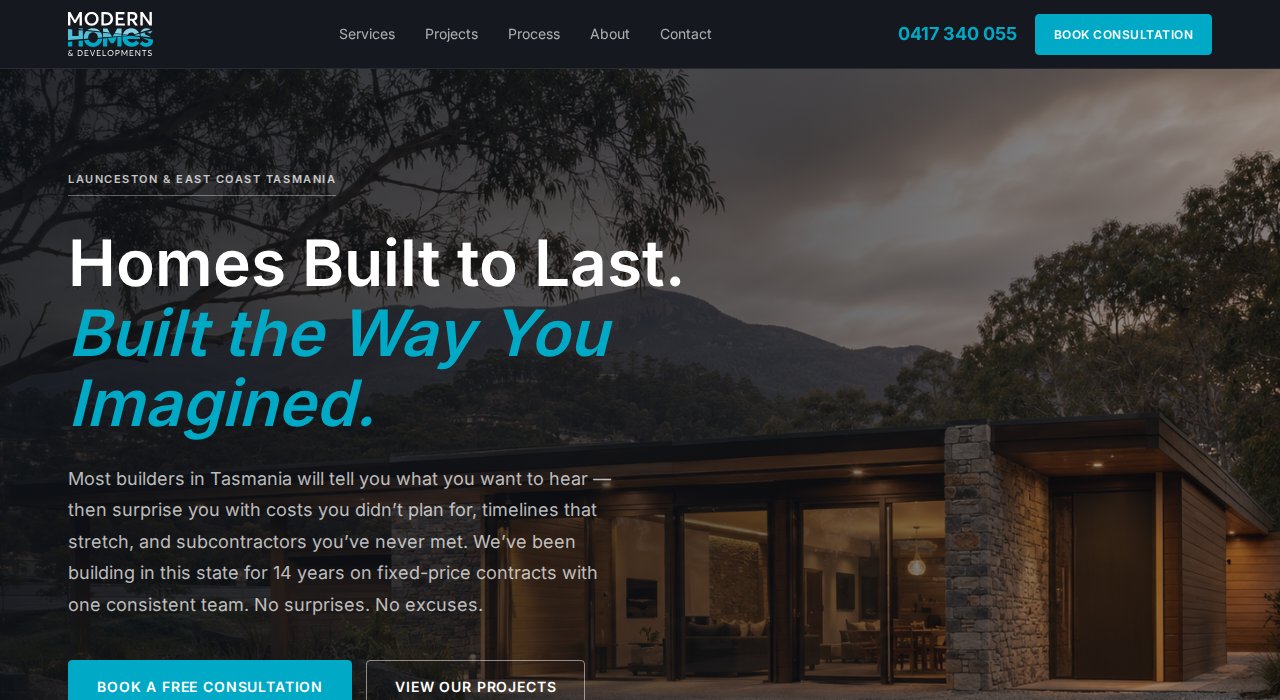
The top of the page: show the home, prove they're legit

ORIGINAL — What They Had

A full-bleed hero with a high-quality photo of a finished home, a headline, and two CTAs: structurally correct.

THE GAP — What Was Missing

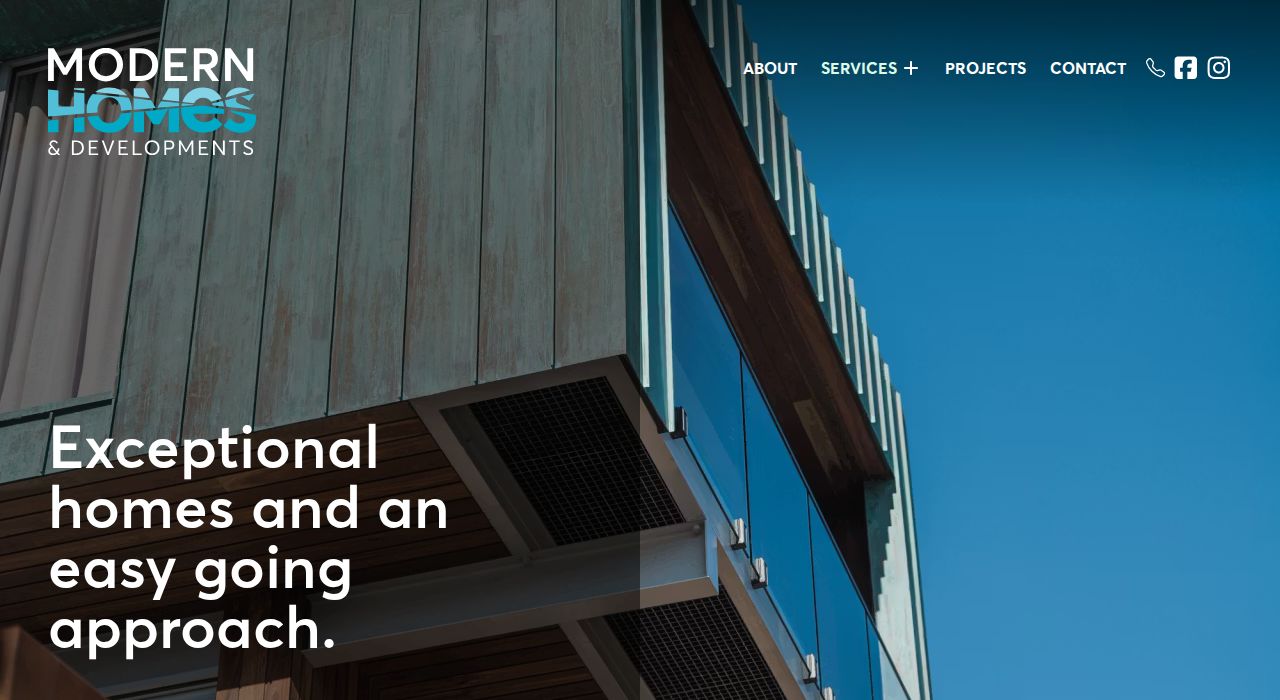
The home photo was so darkened you basically saw a black box when the page loaded, not the home that proves the builder's quality.

TRADESPRO BUILD — What We Added

We lightened the photo so you can actually see the finished home behind the text, and added a trust strip showing their licences and Master Builders / HIA badges right up top, which answers "can I trust this builder?" before a word is read.

TradesPro Feature: Website Builder — hero template with trust bar

You can now see the finished home the moment the page loads
Two buttons: "Book Free Consultation" + "View Projects"
Looks right on phone, tablet and desktop
modernhomestas.com.au → TradesPro rebuild
Rebuilt top of the page, the home photo is now clearly visible
Change 02

Answering the worries that stop people calling

ORIGINAL — What They Had

Service descriptions that positioned the builder as capable, but assumed visitors already trusted them and arrived ready to enquire.

THE GAP — What Was Missing

Someone about to spend $350k is nervous. If the site doesn't calm the big fears (cost blowouts, no-show subbies, delays), they don't call.

TRADESPRO BUILD — What We Added

Three cards that name the big fear and answer it on the spot: fixed price, supervised crew, dates in writing. Half the sales conversation, done before they ring.

TradesPro Feature: Website Builder — fear-and-answer card template

3 buyer fears named and resolved before the visitor voices them
Each card has a specific resolution — not generic reassurance
Converts objections into reasons to call rather than reasons not to
Fear-and-answer cards: Live Preview
Common Fear
Cost overruns nobody warned you about
Hidden variations and scope creep push budgets 15–30% over quote. Most builders won't tell you this upfront.
Fixed-price contracts. What we quote is what you pay — no variation surprises.
Common Fear
Subcontractors you've never met on site
Your build is handed off to a revolving door of subbies. You can't reach anyone when something goes wrong.
Dedicated site supervisor on every build. One point of contact from slab to handover.
Common Fear
Timelines that stretch by months
A 10-month build becomes 16 months. Your rent keeps running. Your life is on hold.
Milestone schedule locked in writing. You know every date before we break ground.
Change 03

6 ways to catch a lead, plus email follow-up

ORIGINAL — What They Had

A phone number and contact email, which only served the small slice of visitors ready to ring today.

THE GAP — What Was Missing

The rest are still researching, comparing, and costing. With no free guide to download and nowhere to leave their details, every one of them was gone for good the moment they closed the tab.

TRADESPRO BUILD — What We Added

Six ways to capture an enquiry: three free downloadable guides (they swap their email for it), an exit popup, a floating booking bar, and a consultation form. Each one lands in the job inbox and kicks off a series of 6 automatic follow-up emails over 28 days — so Modern Homes is still in the inbox weeks later when the buyer is ready to book.

TradesPro Feature: Job Inbox — enquiry capture + automatic follow-up

3 free guides + an exit popup catch people still researching
6 automatic follow-ups start the moment someone downloads
Every enquiry lands in the job inbox, tagged by source and project type
Free PDF

7 Questions to Ask Before Hiring a Builder

The questions most buyers don't think to ask — including the one about fixed-price contracts that can save $40,000 in variations.

Download Free PDF
Free PDF

Tasmania Home Build Timeline

Month-by-month guide covering council approvals, construction stages, and what causes delays at each phase of a Tasmanian new build.

Download Free PDF
Free PDF

Renovation Budget Worksheet

A scoped cost breakdown for Tasmanian renovations — room by room, with typical ranges for structural, cosmetic, and full-gut jobs.

Download Free PDF
Change 04

Showing them exactly what happens after they call

ORIGINAL — What They Had

Service descriptions that named the "what": new builds, renovations, extensions.

THE GAP — What Was Missing

The "how" and "when" were invisible, leaving the #1 reason first-time builders don't enquire ("I don't know what I'm getting into") unanswered.

TRADESPRO BUILD — What We Added

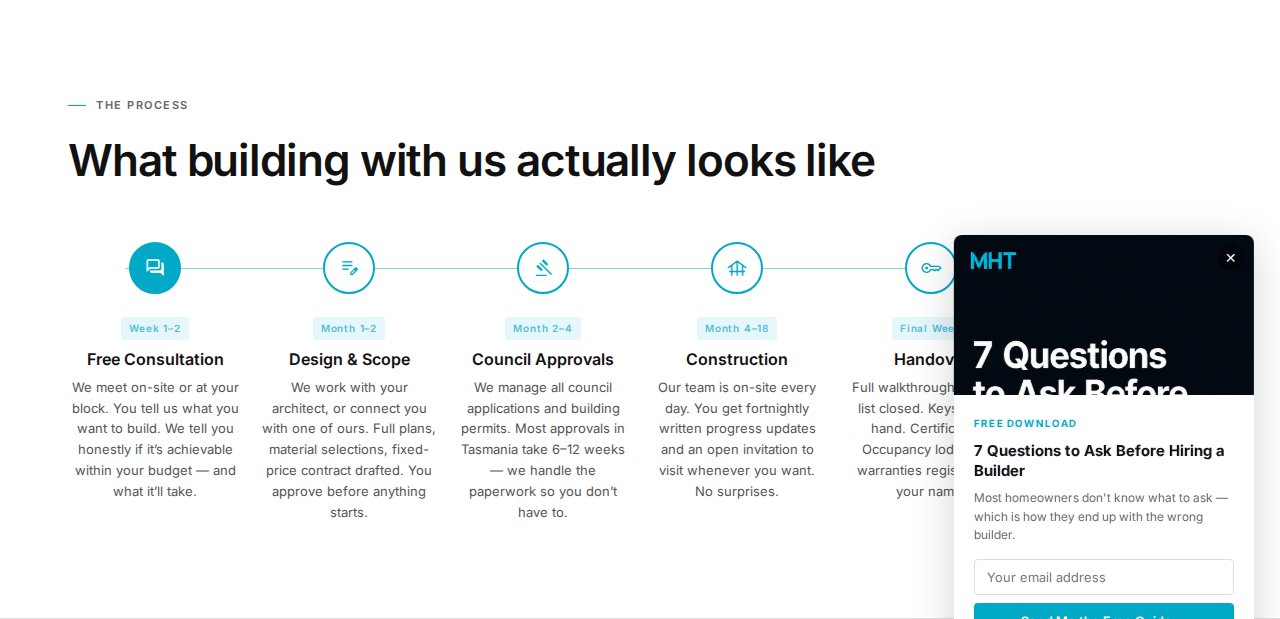
A 6-stage timeline (Consultation → Design & Scope → Council Approvals → Construction → Handover → 12-month Aftercare), each with a realistic time estimate. It positions the builder as organised and transparent before a single meeting.

TradesPro Feature: Website Builder — build process template

6 stages from initial call to 12-month aftercare, each timed
Directly answers the #1 reason people research but don't call
Positions builder as organised before any meeting
Process — 6 stages with time estimates
6-stage build process timeline
Change 05

Before and after photos that show the work

ORIGINAL — What They Had

A real, populated gallery of professional finished photos across multiple projects.

THE GAP — What Was Missing

Finished photos only, with no "before" state, so a renovation client can't see the skill it took to get there.

TRADESPRO BUILD — What We Added

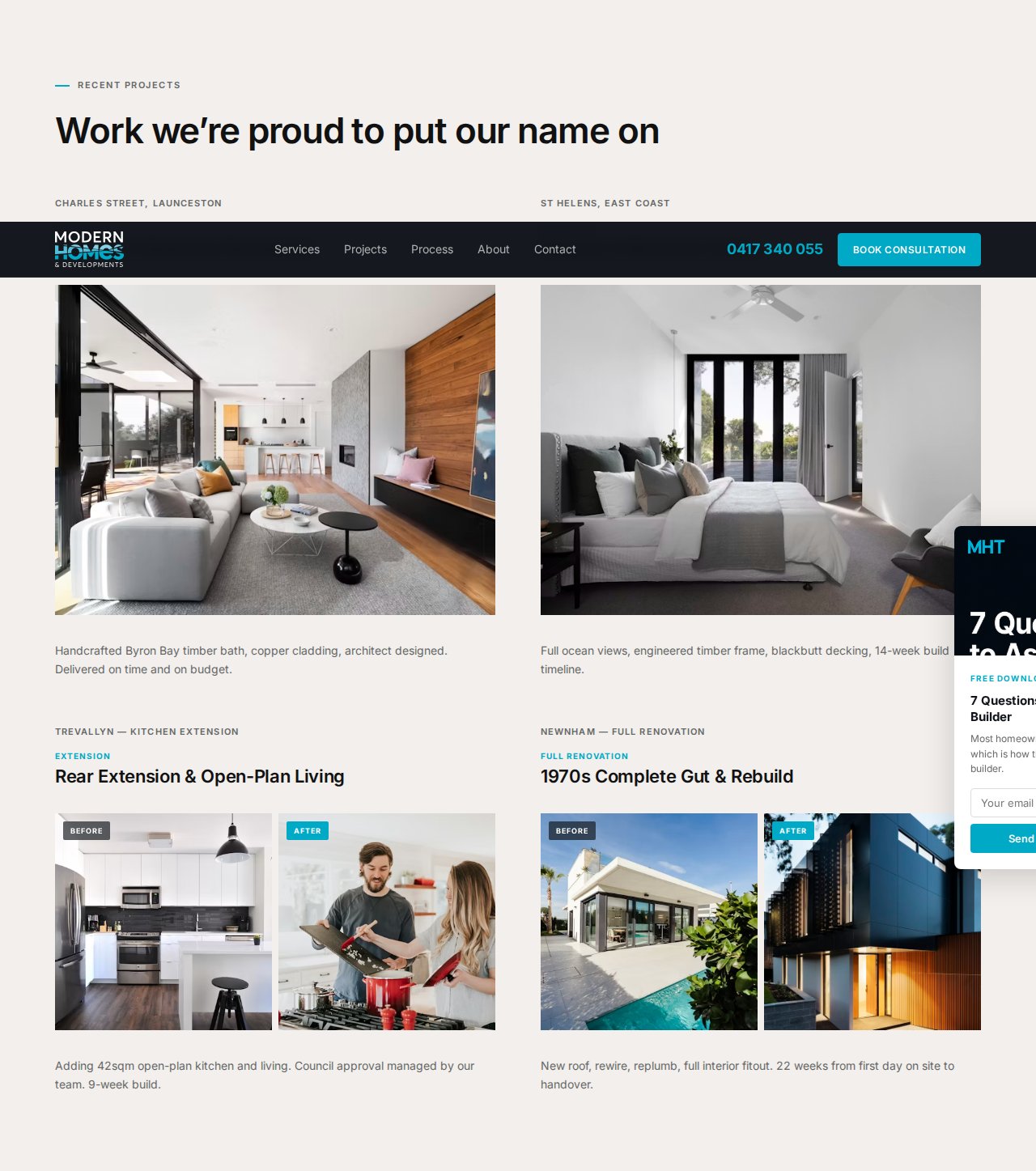
Before and after photos side by side, so the work speaks for itself. When you create a job you attach the before photos; at completion you add the after photos, and the site lines them up automatically.

TradesPro Feature: Website Builder — portfolio/gallery with before/after format

Before-and-after shots make the builder's skill obvious at a glance
People see the transformation, not just the finished result
Before photos attach in your CRM, lined up on the site automatically
Portfolio — before/after renovations + new builds
Portfolio section with before/after cards
Change 06

Google reviews shown right on the page

ORIGINAL — What They Had

Real Google reviews, earned but sitting on a Business Profile that visitors had to leave the site to find.

THE GAP — What Was Missing

Zero reviews on-site, so the builder's reputation was invisible at the exact point of decision.

TRADESPRO BUILD — What We Added

Three verified Google reviews inline with star ratings, names, and locations, plus schema markup so the star rating shows in search before visitors arrive. Review Automation collects new reviews after each job and feeds them to the site.

TradesPro Feature: Review Automation — auto-collect + display reviews

3 verified Google reviews inline with names, locations, stars
Review schema markup for Google rich results
Auto-collection after job completion, no chasing clients
★★★★★
"Locky and the team were exceptional throughout our new build. Fixed price meant no surprises — we came in exactly on budget. Communication was clear at every stage. Would recommend to anyone building in Tasmania."
SH
Sarah H.
G Verified Google Review · Launceston
★★★★★
"Our renovation was handled from start to finish without us having to chase anyone. The before/after result speaks for itself — completely transformed. The site supervisor was on-site every day."
MR
Marcus R.
G Verified Google Review · St Helens
★★★★★
"Best builder experience we've had. The process timeline they showed us was accurate to the week. Handover was on schedule. It's rare to find a builder who actually delivers what they quote."
JP
James P.
G Verified Google Review · Bicheno
Change 07

8 common questions answered before they pick up the phone

ORIGINAL — What They Had

Positioning copy covering credentials and approach, but no answers for specific questions like fixed-price vs cost-plus, payment schedules, or council approvals.

THE GAP — What Was Missing

Every question they can't get answered sends them off to Google, often onto a competitor's site.

TRADESPRO BUILD — What We Added

8 questions as an FAQ accordion with FAQPage schema, covering the 5 most common reasons people research builders but don't call. It does two jobs: answers what buyers are wondering, and helps you show up on Google for searches like "fixed-price builder Tasmania."

TradesPro Feature: Website Builder — FAQ with schema markup

8 questions covering cost, contracts, approvals, timelines
FAQPage schema, eligible for Google rich results
Each question is written to show up for a specific Google search
Do you offer fixed-price contracts?
Yes. Every Modern Homes project is quoted on a fixed-price contract. What we quote is what you pay. Variations are only raised if you change the scope in writing — cost overruns from our side are not passed on to you.
How long does a new build take in Tasmania?
Most new builds in Tasmania take 12–18 months from consultation to handover. The Consultation and Design phase takes 1–2 months. Council approvals typically take 2–4 months. Construction runs 8–14 months depending on scope and complexity.
Do I need council approval for a renovation?
Most structural renovations in Tasmania require a building permit from your local council. Cosmetic works (painting, flooring, kitchen cabinetry) typically don't. We handle permit applications for all permitted works as part of our service — you don't deal with the council directly.
What's the minimum project size you take on?
For renovations, our minimum engagement is $80,000. For new builds, we work on projects from $350,000 upwards. This reflects the level of project management, supervision, and fixed-price underwriting we provide on every job.
Change 08

Two ways to get in touch: a form and a phone number

ORIGINAL — What They Had

A phone number in the nav and on the contact page: the right foundation for call-ready buyers.

THE GAP — What Was Missing

A phone-only path serves only people ready to cold-call a stranger. With no form and no off-hours capture, every after-hours visit was a dead end.

TRADESPRO BUILD — What We Added

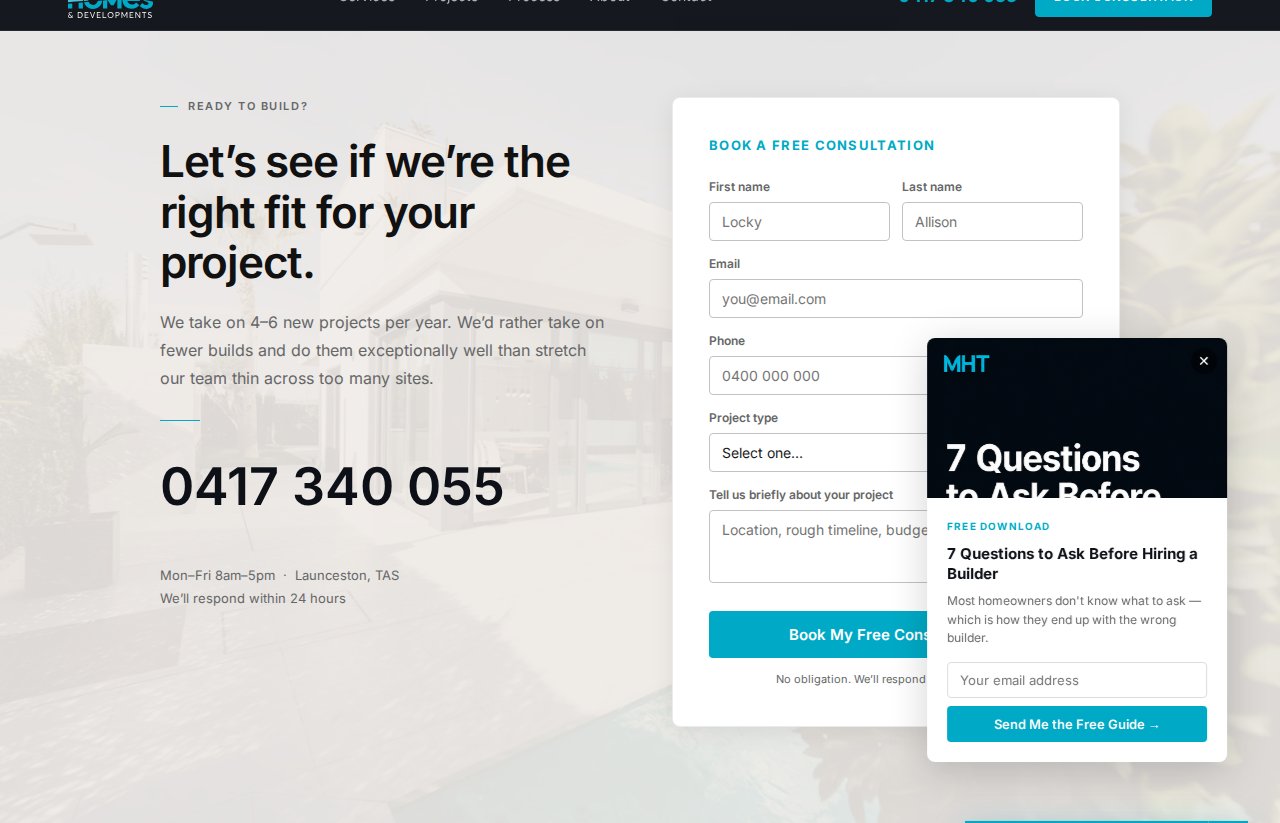
A two-column section: phone left, white form card right (name, email, phone, project-type dropdown, message). The dropdown pre-qualifies enquiries, and every submission lands in the job inbox tagged and ready — no manual data entry.

TradesPro Feature: Job Inbox — enquiry capture and tagging

The form catches the bloke filling it out at 11pm when you're asleep
Project-type dropdown pre-qualifies enquiries automatically
Every submission lands in your job inbox, tagged — no typing it up
Contact — form + phone, image background
Contact section with form and phone
Change 09

The "spots are limited" booking nudge

ORIGINAL — What They Had

CTAs in the hero and on the contact page, serving visitors who were already decided.

THE GAP — What Was Missing

No urgency for the fence-sitters in between. On a $400k custom build, "I'll come back to this" almost always means never.

TRADESPRO BUILD — What We Added

A floating pill that pops up once someone's scrolled down a bit, so you know they're actually interested. The scarcity is real (boutique builders genuinely take 3 project starts per quarter) and the calendar icon nudges them to book, not just contact.

TradesPro Feature: Website Builder — the booking nudge

Pops up once someone's scrolled down a bit, so you know they're interested
Real scarcity: 3 project starts per quarter is genuine
Converts fence-sitters who skipped the earlier in-page CTAs
3 project starts this quarter 2 spots remaining — book a free consultation
Book Now →

Pops up once someone's scrolled down a bit. Bottom-right corner of every page.

Change 10

The enquiry that didn't book still gets followed up — automatically

ORIGINAL — What They Had

No follow-up system. An enquiry came in, the builder called if they remembered, and if they didn't call back within 24 hours the job was probably gone.

THE GAP — What Was Missing

Most $300k–$600k build enquiries don't book on the first contact. They're comparing 2-3 builders. The builder who follows up on day 3 and day 7 — with something useful, not a sales call — wins more of them. Without automation, that follow-up just didn't happen.

TRADESPRO BUILD — What We Added

Every enquiry kicks off an automatic follow-up sequence: Day 0 welcome, Day 3 useful content (the fixed-price article), Day 7 the process timeline, Day 14 a project start availability nudge. If they book a consultation, the sequence stops. If they go quiet, they get a gentle reactivation on Day 21 and Day 28. All without the builder touching anything.

TradesPro Feature: Automatic Follow-Up — missed enquiry recovery

6 follow-up touchpoints over 28 days — stops the moment they book
Who-to-call-next view shows the warm enquiries at a glance
Runs while you're on site — zero manual follow-up required
Automatic follow-up — 6 emails over 28 days
Starts on every form submission or guide download
Welcome — your free guide is attached
Day 0
One thing that saves builders $40,000 in variations
Day 3
Here's exactly what happens after you call us
Day 7
We have 2 project starts left this quarter
Day 14
Still thinking it over? Here's what to ask any builder
Day 21
Ready to book a free consultation?
Day 28
Change 11

Every happy client becomes a referral source — automatically

ORIGINAL — What They Had

Word of mouth was already working — it had built the business to this point. But it was entirely passive: the builder had no way to know who was referring people, or to make it easy for them to do so.

THE GAP — What Was Missing

Happy clients wanted to refer friends but there was no easy way to do it. No shareable link, no way to track it, no acknowledgement when a referral enquired. The referral that should have come in usually didn't.

TRADESPRO BUILD — What We Added

At job handover, every client gets a unique referral link. They share it with a mate, the mate clicks it and submits an enquiry, and it lands in the job inbox tagged with who sent them. The builder can see every referral from link sent to job won — and the referrer can be thanked by name.

TradesPro Feature: Word-of-Mouth Tracker — referral link per client

Unique referral link sent to every client at handover
Referral enquiry lands in job inbox tagged with who sent them
Full tracking from link shared to job won
Word-of-Mouth Tracker — live preview
Sarah H. shared her referral link
3 days ago · Launceston new build client
New enquiry — referred by Sarah H.
Today · New build, Launceston · $420k–$480k
3 referrals this quarter
1 booked · 1 in consultation · 1 researching
Local Search Infrastructure

The local search hub that makes referrals optional

Articles that catch buyers at every stage of deciding, from "how much does it cost to build in Tasmania" to "best boutique builders Launceston."

SEO Layer 01

29-Article Blog Hub

ORIGINAL — What They Had

Direct and referral traffic, meaningful for an established builder but built only to serve people who already knew the business.

THE GAP — What Was Missing

Zero organic discovery. Hundreds of monthly Tasmania searches returned nothing from Modern Homes, so all that intent went to competitors.

TRADESPRO BUILD — What We Added

29 articles across 11 categories (Guides, Checklists, Cost Data, Case Studies, Tools), each one written to show up for a specific Google search, with the right next step for where the reader's at. A sticky filter bar and an embedded cost estimator do the rest.

TradesPro Feature: Local Search Pages — expert articles, written for you

29 articles across 11 categories, each written to show up on Google
Sticky filter bar + embedded cost estimator tool
Each article points the reader to the right next step
All Guides Checklists Cost Data Case Studies Tools
Cost Data

How Much Does It Cost to Build a House in Tasmania in 2025?

8 min read · 4,200 words · Embedded cost calculator
Checklist

7 Questions to Ask a Builder Before You Sign Anything

5 min read · 2,800 words · Downloadable PDF
Guide

Fixed-Price vs Cost-Plus Contracts: What Every Tasmania Builder Should Tell You

6 min read · 3,100 words
SEO Layer 02

Articles for buyers at every stage, from 'just looking' to 'ready to sign'

ORIGINAL — What They Had

Service pages and a portfolio for buyers ready to sign, which only speak to a tiny slice of people searching for builders in Tasmania.

THE GAP — What Was Missing

Nothing for everyone else: the people who are months out, still comparing, and the ones nearly ready, all yours if you reach them first.

TRADESPRO BUILD — What We Added

29 articles for buyers at every stage: ones for people just looking, ones for people comparing builders, and ones for people ready to sign. Each stage points the reader to the right next step, from a free guide to booking a consultation.

TradesPro Feature: Local Search Pages — content mapped to buyer stages

Articles for people just looking, months out from a decision
Articles for people comparing builders, weeks out
Articles for people ready to sign, each with its own next step
Problem-Aware

Early researchers — months from a decision

Cost guidesHow much does it cost to build in Tasmania?
What to expectHow long does a new build take?
ExplainerWhat is a building permit and do I need one?
Solution-Aware

Comparison shoppers — weeks from a decision

ComparisonBoutique vs volume builder: which is right?
Contract typeFixed-price vs cost-plus: the real difference
Criteria7 questions to ask before signing
Product-Aware

Decision-ready buyers — days from a call

Case studyModern Homes Tasmania — Launceston new build
Local authorityWhy experience in Tasmania matters for approvals
ProofWhat our fixed-price contract actually covers
SEO Layer 03

Footer SEO — 50+ Linked Pages

ORIGINAL — What They Had

A clean, minimal footer with standard nav links: Home, Services, Portfolio, Contact.

THE GAP — What Was Missing

No pages for the towns they work in. Most building enquiries start with a local Google search, yet without a page for each town they work in, they never showed up for those searches across most of the coast they served.

TRADESPRO BUILD — What We Added

A 4-column footer linking 50+ pages: 10 town, 8 service, 6 comparison, 8 resource. Each one is built to show up for a specific Google search, all generated by the SEO Content Engine from the builder's service area and offering.

TradesPro Feature: SEO Content Engine — location + service pages

10 town + 8 service pages show up for local and service searches
6 comparison + 8 resource pages catch people still researching
Most building enquiries start with a local Google search; this is how you show up
TradesPro Feature Map

Every tool we switched on for this build

7 systems doing the selling for you, all working together while you're on the tools.

Feature
What it does on this site
Revenue impact
Website Builder
Clear home photo + trust strip, fear-and-answer cards, build process timeline, FAQ accordion with schema, before/after photo gallery, two-path contact form, the booking nudge
The foundation — every part of the page earning its keep
Job Inbox — Enquiry Capture
6 capture points: 3 free guides, exit-intent popup, floating CTA, consultation form. Every submission lands in the job inbox automatically, tagged by source and project type.
Every enquiry tracked — nothing lost
Review Automation
Reviews collected automatically after job completion, displayed inline with schema markup. Star rating appears in search before visitors arrive.
Trust built before the call
Local Search Pages
29 expert articles written for you, for buyers at every stage. 10 town pages, 8 service pages, 6 comparison pages, 8 resource pages. 50+ linked pages locals can find on Google.
Organic discovery — referrals optional
Automatic Follow-Up
6 follow-up touchpoints over 28 days start on every download or form submission, keeping Modern Homes in front of the buyer from first look to decision. Stops the moment they book.
Research-to-booked conversion
Word-of-Mouth Tracker
At handover, every client receives a unique referral link. When a mate clicks it and enquires, it lands in the job inbox tagged with who sent them. Full tracking from link shared to job won.
Word of mouth, tracked and repeatable

7 systems doing the selling for you, all working together while you're on the tools.

What It Looks Like

Every section — in screenshots

Key sections from the rebuilt site. Each one designed to move a qualified buyer one step closer to picking up the phone.

Top of the page — the home is now clearly visible
Hero section

Top of the page — first impression

We lightened the photo so the finished home shows through, with a licence and credentials strip (Master Builders, HIA Certified, Fixed-Price, Licensed) below.

Portfolio — before/after renovations + new builds
Portfolio section — before/after cards

Portfolio — before/after photo gallery

Before and after photos side by side, so the work speaks for itself.

Process — 6 stages with time estimates
Process timeline — 6 stages

Process — 6-Stage Build Timeline

Six stages with time estimates from Week 1–2 (Consultation) through Ongoing (Aftercare). Directly answers: "What happens after I call?"

Contact — form + phone, image background
Contact section

Contact — Two-Path Enquiry

Phone prominent left, white form card right (name, email, phone, project-type dropdown, message). 24/7 capture, including the 11pm decision moment.

Under the Hood

How every enquiry gets captured and followed up automatically

Every capture point triggers an automatic action. You don't chase cold enquiries: you wake up with warm prospects already nurtured for weeks, whether you were on site, at handover, or off the clock. That's the difference between a business card and a local job system.

Every download creates an entry in the job inbox, tagged by source and project type
6 automatic follow-ups start immediately — stops the moment they book
Consultation booking lands in the job inbox ready to action
Inbox — 6 follow-up emails over 28 days
Starts on every guide download or form submission
Welcome — you've requested the [guide name]
Sent immediately
One thing builders wish they'd known earlier...
Day 3
The fixed-price difference — what it means for your budget
Day 7
How long will my build actually take?
Day 14
We have 2 project starts available this quarter
Day 21
Ready to book a consultation?
Day 28
The Full Picture

A complete site built to win the big jobs

Every section earning its keep. Nothing on the page is just decoration.

modernhomestas.com.au — TradesPro rebuild Open live demo
Full rebuilt Modern Homes Tasmania website — all sections

Every section is there to win you work.

What the Rebuild Delivers

What the rebuild actually delivers

11
changes documented in this teardown
6
ways to capture an enquiry
29
articles pulling in Google traffic
$500k
additional revenue ceiling / year
Ready to stop leaking revenue?

Your site is leaking revenue right now.

We do this for builders, plumbers, electricians, and trade specialists across Australia. Fixed scope. Fixed price. Delivered in 2 weeks.

Build my site →